GuidesGuide · ChatGPT
ChatGPT business profiles in Australia: how to claim yours, and what works here today

Call 1800 570 693 to talk to the demo agent. Plans start at A$49 a month.
Key takeaways
- Businesses in ChatGPT launched in beta on 10 November 2026. It covers a business profile, Insights on how often ChatGPT mentions you, and business agents that answer questions about what you sell.
- From Australia you can claim and verify a domain today. The ID check that publishes the profile offered only the United States when we tried, so the profile stays a draft.
- Claiming doesn't change how ChatGPT ranks or recommends you. OpenAI says so in its own words, and ChatGPT can show your business whether you claim it or not.
- The quickest verification is a DNS TXT record. In most registrar panels you type only the short host, openai-business-profile, because the panel adds your domain itself.
- A published profile can't be deleted or hidden by support. Only a draft can be deleted, so get the description and category right while it's still a draft.
What a ChatGPT business profile is
OpenAI launched Businesses in ChatGPT in beta on 10 November 2026. Through a new area called Business Hub, a business can claim its listing, manage what ChatGPT shows about it, and see how people engage with it inside ChatGPT.
The profile is the page a person sees when they click a business that ChatGPT has named in an answer. It carries your website, a short description, one category, a logo and cover photo, and your delivery and returns policies.
Insights shows activity over the past 28 days, such as how often ChatGPT mentioned you and how many people clicked through to your website. For an online business a mention counts when ChatGPT references your website. Your brand name on its own doesn't count. A metric that shows blank can mean activity hasn't reached OpenAI's reporting threshold, and doesn't have to mean zero.
Business agents are a separate piece. A business agent answers questions about what a business sells, in a conversation that's labelled and kept apart from ChatGPT's own answers. It can't take a payment or make a booking. It links people to your website to finish the job.
None of this is the ChatGPT Business plan. That's OpenAI's paid workspace subscription for teams, and it shares the name, which is why searches for "ChatGPT Business" mostly return plan pages.
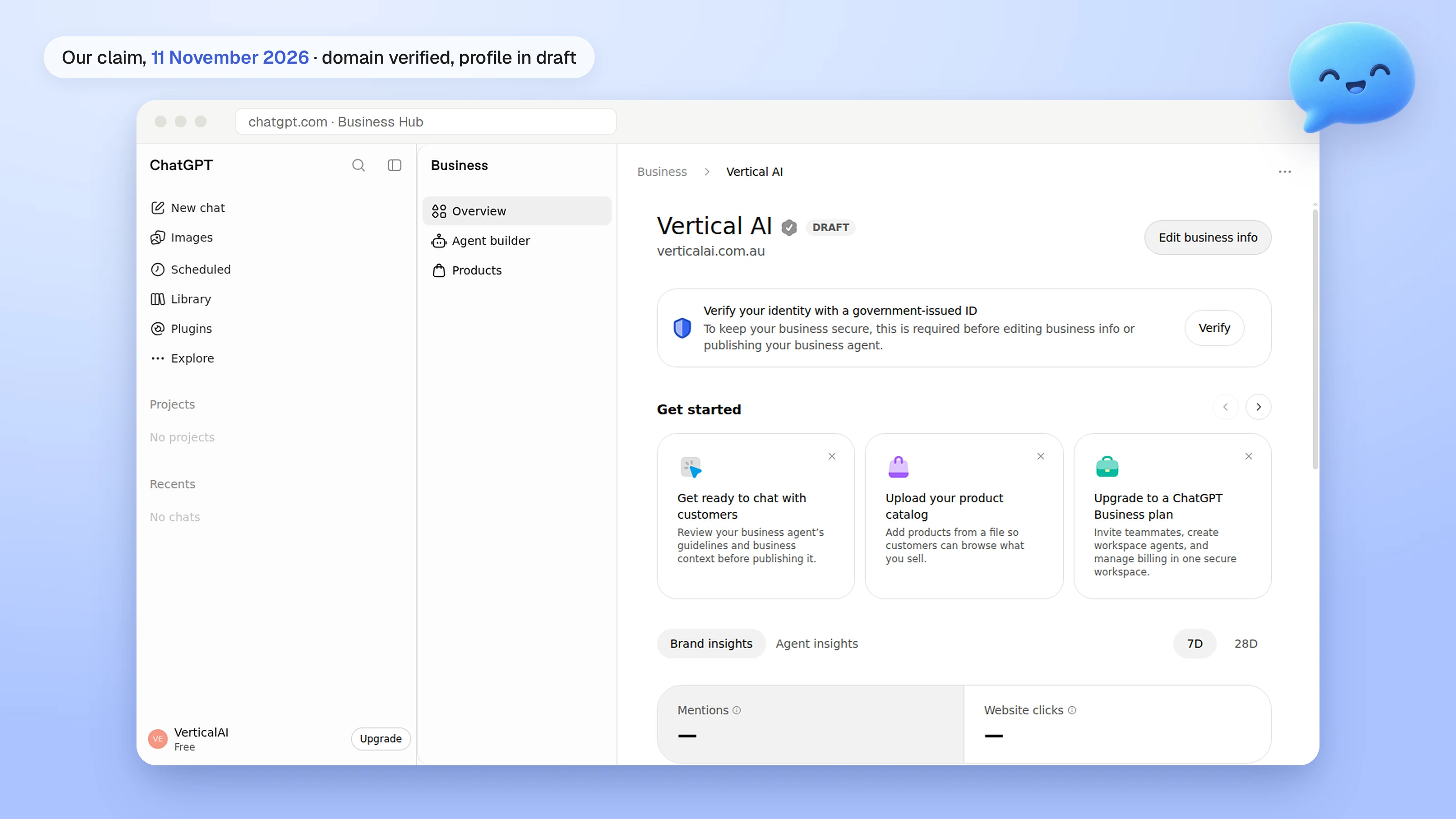
What an Australian business can do today
OpenAI says any eligible business located where ChatGPT is available can claim through Business Hub, and that availability depends on the business's location and type and on whether the required verification is supported there. In practice that splits into the parts below. The Australian column is what we saw on our own claim on 11 November 2026.
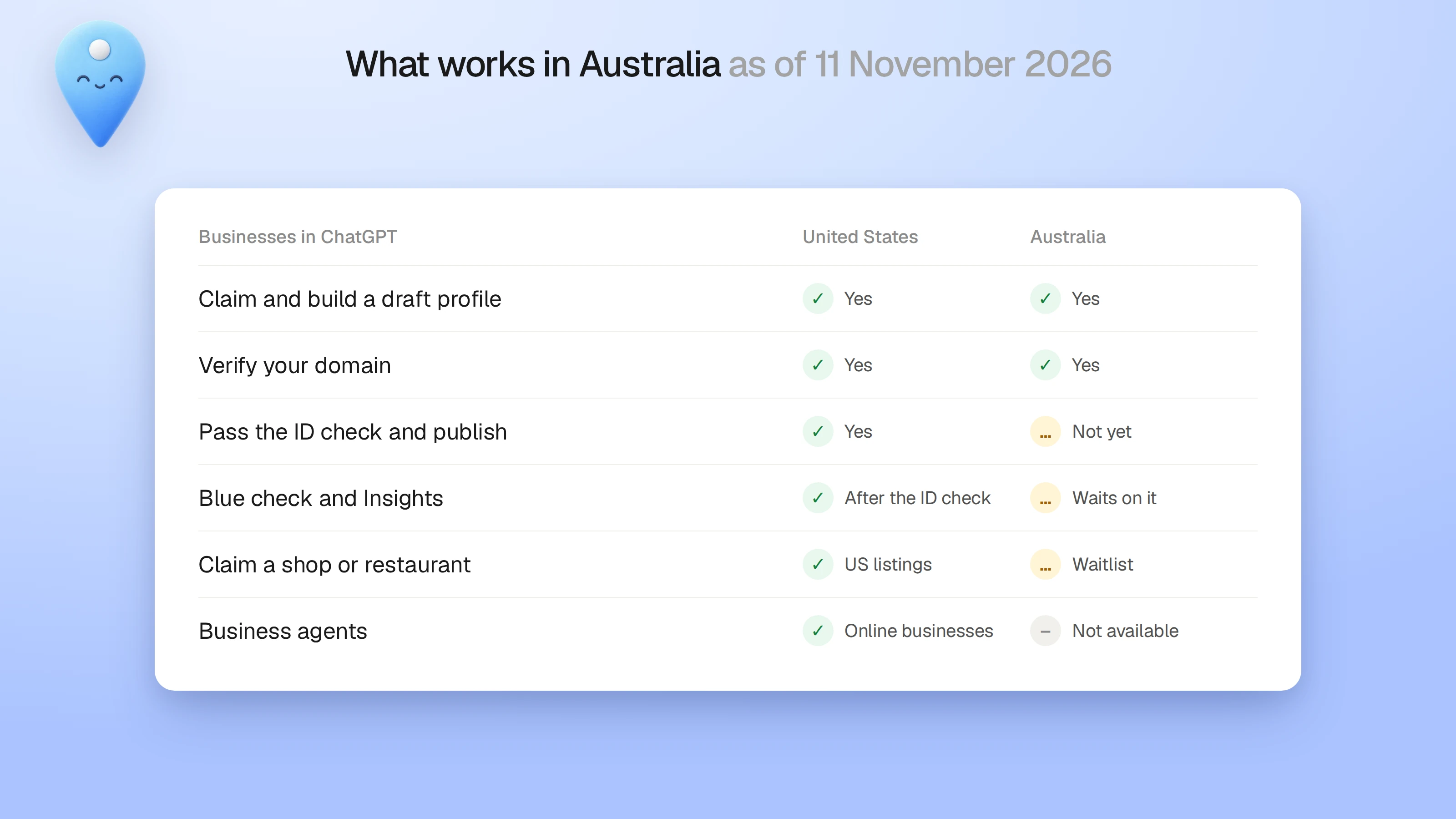
- OpenAI hasn't named Australia anywhere, for or against. It says it plans to expand to more markets and business categories over time, with no dates.
- The help centre says local stores and restaurants can currently claim only an existing US listing. That matches the waitlist we saw on the physical location route.
- We went through as an online store. That route let us verify the domain and fill in the whole draft before the ID check stopped us.
| Part | United States | Australia, as we found it |
|---|---|---|
| Start a claim and build a draft profile | Yes | Yes |
| Verify your domain with a TXT record | Yes | Yes, ours verified |
| Claim as a physical shop or restaurant | Only an existing US listing | Goes to a waitlist |
| Pass the ID check and publish | Yes, through Persona | No, Persona offered only the United States |
| Blue check on the profile | After the ID check is approved | Waits on the ID check |
| See Insights | After the ID check | Waits on the ID check |
| Publish a business agent | Ecommerce and online services with a website | Not available |
The steps to claim your business on ChatGPT
This is the order the screens came in on our claim. You need a ChatGPT login, any plan, and access to your domain's DNS settings. You don't need an Ads account.
- Sign in to ChatGPT and open Business Hub from the sidebar. Search for your business by name.
- Pick how you sell. The options were at a physical location, through an online store, and through a service.
- Show that you own the business. The methods offered can include a website domain, a phone number, a business email or Shopify. A domain is the one that worked for us.
- Add your website, then pick one category. Only one is allowed, so pick the one a customer would search for.
- Write the description. The field held about 300 characters.
- Set your delivery and returns policies. A service business with no delivery can say so.
- Add a contact phone number and email if you want them. Both are optional and each needs a code.
- Start the identity check with Persona. Until it's approved the profile stays a draft.
The DNS TXT record and the mistake that breaks it
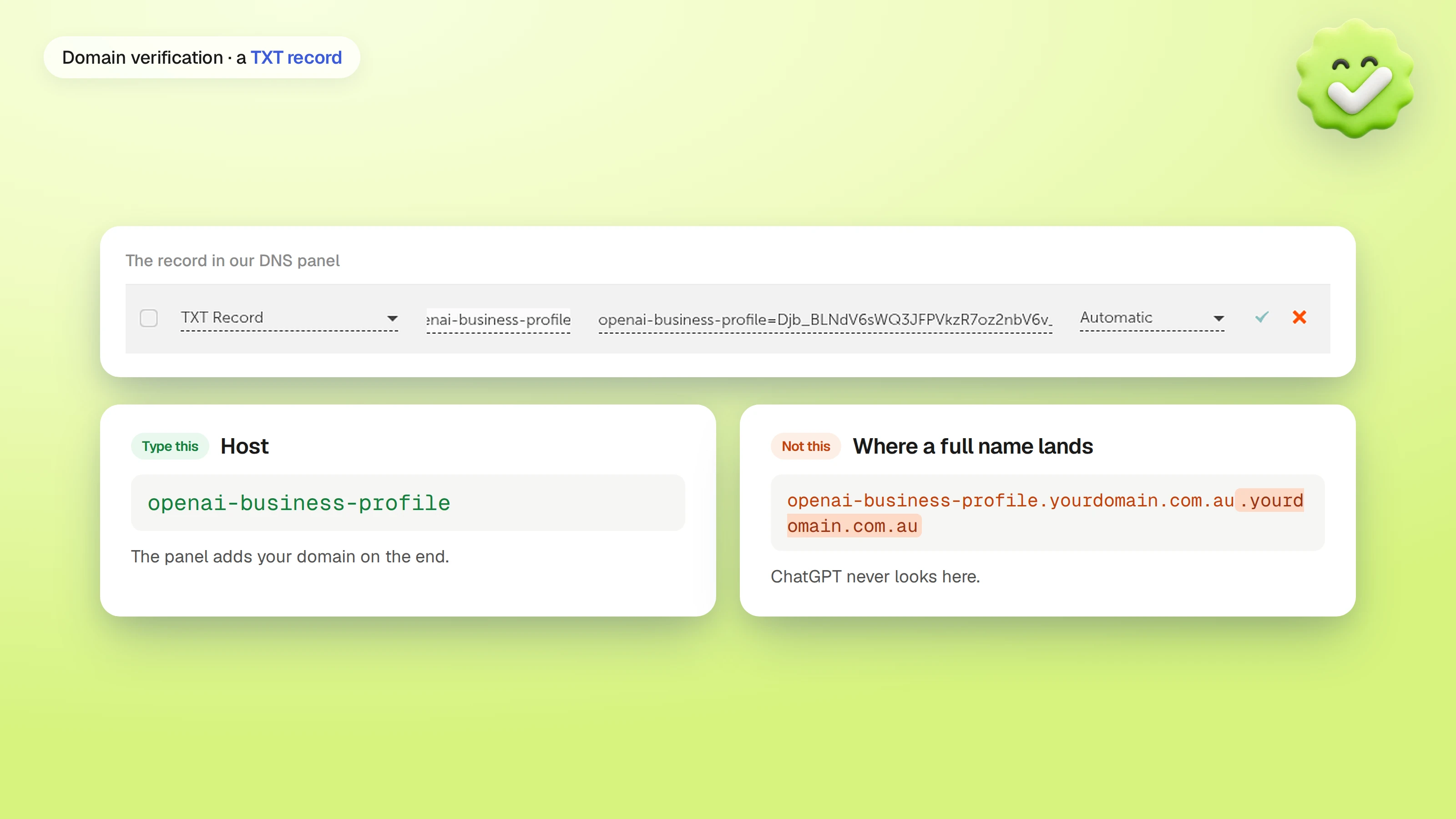
Domain verification asks you to add a TXT record to your domain. The host is openai-business-profile, and the value starts with openai-business-profile= followed by a long code that's different for every attempt. If you abandon a claim and start again, you get a new value, so update the record or delete the old one.
Most registrar panels add your domain to the end of the host for you. If you paste the full name, the panel adds the domain a second time, and the record ends up at openai-business-profile.yourdomain.com.au.yourdomain.com.au, where ChatGPT never looks. That's what stalled our first attempt in Namecheap. Type only openai-business-profile in the host box when the panel shows your domain after it.
To check it's live, run dig TXT openai-business-profile.yourdomain.com.au +short in a terminal, or use any online DNS lookup for that name. When the value comes back, go back to ChatGPT and verify. Ours was visible on public resolvers the same morning. OpenAI says DNS changes can take time to appear.
Leave the record in place after it verifies. OpenAI doesn't say whether it checks the record again later, and it costs nothing to keep.
When the phone or email code doesn't arrive
The contact phone number and email on the profile each need a code, by text message or an automated call. Our codes wouldn't send to a business line on an internet phone service. After a few tries the page said "Too many requests", and then the email code stopped sending too.
Both fields are optional, so we left them blank and published the phone number in the description. If your codes fail, verify the claim with your domain and come back to the contact fields another day. Use a mobile number if you want one there.
The Persona ID check, and why it shows only the United States
OpenAI runs identity checks through a company called Persona. You need to pass it before you can publish changes to your business information, see Insights, or create a business agent. OpenAI says you may need a government-issued ID, business registration details and proof that you're allowed to represent the business, and that the name, address and any registration or tax number must match your official records.
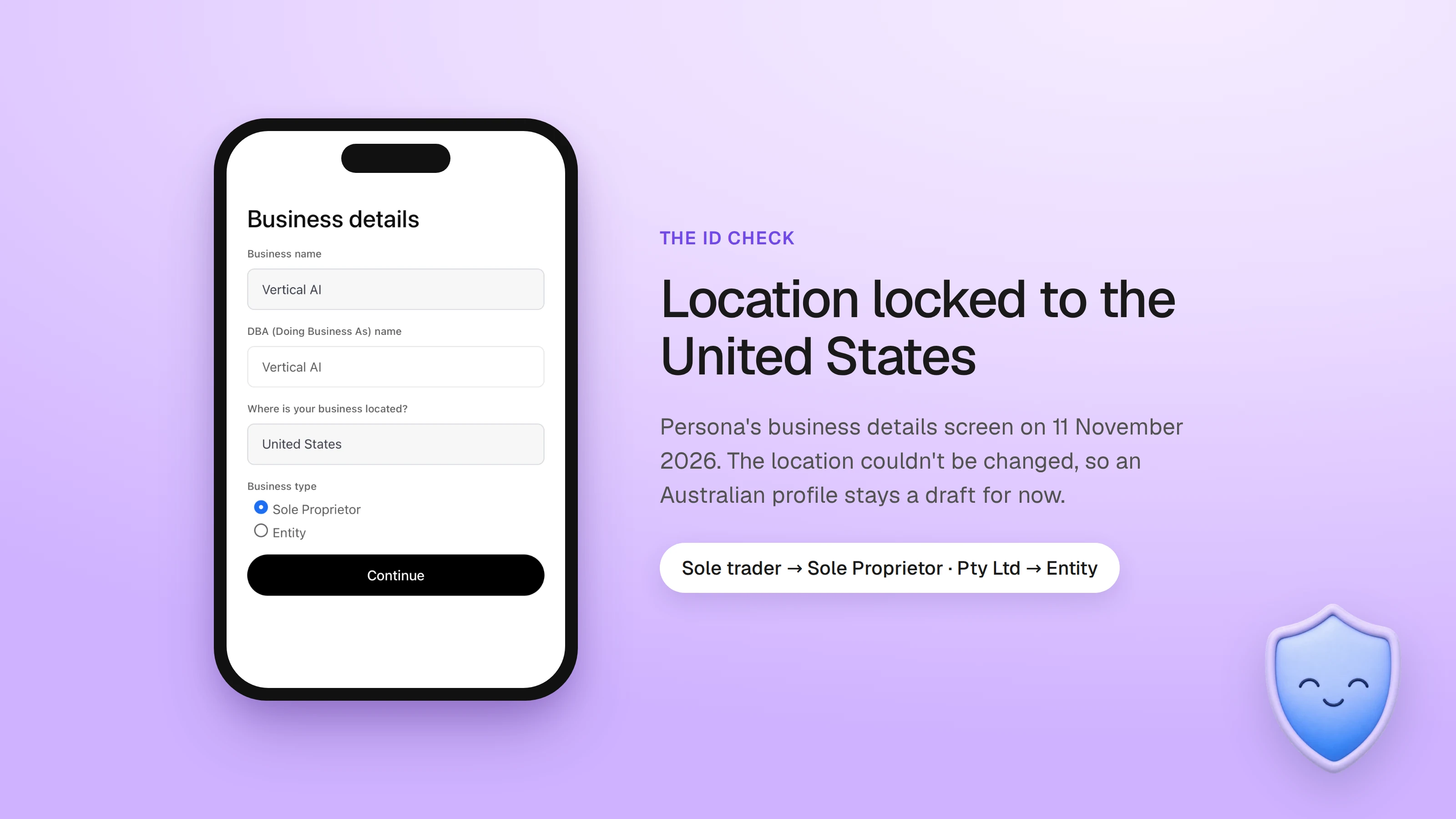
On our claim the Persona screen asked for the business name, a trading name, where the business is located and the business type, Sole Proprietor or Entity. The location was fixed at United States and couldn't be changed. We read a sole trader as a sole proprietor and a Pty Ltd company as an entity.
Don't push an Australian business through as a US one. Your ABN and your ASIC registration won't match US records, and developers on OpenAI's community forum report that a failed Persona check on an API organisation couldn't be retried. Close the page and leave the profile as a draft.
OpenAI's pages disagree on when the blue check appears. The landing page says it shows once a business is claimed. The help centre says claiming alone doesn't give a blue check, and that it appears after Persona approves you. The help centre is the newer and more detailed of the two.
Draft and published profiles
Until the ID check is approved, your profile is a draft. Nobody sees it in ChatGPT, and you can delete it.
When Persona approves a new profile, OpenAI publishes it automatically. There's no separate publish button. After that, OpenAI's support team can't delete, unpublish or hide the profile, so the draft is the time to get the description, category and logo right.
Choosing the category and writing the description
Pick the one category a customer would use to describe you. If you sell more than one thing, choose the one that brings in most of the work.
The description is short, so spend it on facts a person or ChatGPT can check against your website: what you do, who it's for, where you are and how to reach you. OpenAI's policy for Businesses in ChatGPT asks for accurate information, so leave out claims you can't back up. This is the one we wrote for our own draft:
"Perth company making AI receptionists and voice agents for Australian businesses and contact centres: trades, clinics, mining, finance, healthcare and insurance. Answers calls 24/7, takes bookings and hands over to staff. Call data stays in Australia. From A$49 a month. Demo: 1800 570 693"
Claiming and how ChatGPT ranks you
A claim has no direct effect on that. OpenAI says ChatGPT keeps making independent recommendations and comparisons, and that claiming doesn't guarantee higher placement or sales. Ads don't change its answers either. ChatGPT can name your business whether or not you claim it.
What a claim gives you is control of the facts on your profile, and once you're verified, Insights on how often you're mentioned. Being named in the first place still comes from your website and from the other sites ChatGPT reads: reviews, directories and the best-of lists in your industry.
ChatGPT business profiles and Google Business Profile
A ChatGPT business profile doesn't replace Google Business Profile. Google Ads data read on 11 November 2026 puts "google business profile" at about 49,500 searches a month in Australia, and the ChatGPT terms had no measurable volume the day after launch. Keep Google Business Profile current first.
Keep your business name, address, phone number and opening hours the same on your website, Google, Apple Maps and every directory. ChatGPT reads those sources too, and a mismatch is the easiest thing to fix.
What to do while Australia waits
These are the steps that help now and carry over once the ID check opens here.
- Claim your business, verify the domain and finish the draft, then leave it parked.
- Check your robots.txt doesn't block OAI-SearchBot, the crawler ChatGPT search uses. If it's blocked, ChatGPT can't read your site to cite it.
- Put the facts a customer asks about on your own website in plain words: services, areas, prices where you publish them, hours and how to book.
- Get listed on the directories and best-of lists that rank for your service in your city. AI answers often quote those pages.
- Check Business Hub every few weeks for an Australian location in the ID check, then finish it.
Where the phone still fits
A business agent can answer questions, but it can't book or take a payment, and it isn't open to Australian businesses yet. For a service business, the person who finds you in ChatGPT still books by phone or through your website. The phone side is the part our voice agents look after.
Questions
Yes, you can start a claim, verify your domain and build a draft profile. When we tried on 11 November 2026, the Persona ID check that publishes the profile offered only the United States as the business location, so an Australian profile stays a draft for now.
Claiming cost us nothing, and OpenAI says you don't need an Ads account or an Enterprise agreement. OpenAI hasn't published a price for Business Hub or business agents. Ads that point to a business agent are paid.
No. OpenAI says claiming doesn't guarantee higher placement or sales, and ChatGPT keeps making independent recommendations. Claiming gives you control of your profile's facts and, once verified, Insights on how often you're mentioned.
A TXT record at the host openai-business-profile, with the value ChatGPT shows you, which starts openai-business-profile=. Most panels add your domain to the host, so type only the short host, or the record lands at the wrong name.
OpenAI says verification depends on the business's location and type, and on whether the required verification is supported there. It hasn't said when other countries open. Don't submit an Australian business as a US one, because your ABN and ASIC records won't match.
No, not yet. OpenAI says business agents are available to eligible ecommerce and online service businesses in the US with a website, and plans to expand to more markets over time without giving dates.
You can delete it only while it's a draft. Once Persona approves a new profile it publishes automatically, and OpenAI's support team can't delete, unpublish or hide a published profile.
No. ChatGPT Business is OpenAI's paid workspace subscription for teams. A business profile is free to claim through Business Hub and is about how your business appears to people using ChatGPT.
Yes. Google Business Profile is still where most Australians find local businesses, and ChatGPT reads the same public facts. Keep your name, address, phone and hours the same on both.
Sources
- OpenAI, Introducing Businesses in ChatGPT, 10 November 2026
- OpenAI, Businesses in ChatGPT
- OpenAI Help Center, Setting up your business on ChatGPT
- OpenAI, Businesses in ChatGPT policy
- OpenAI, Business agents policy
- OpenAI Developer Community, organisation verification blocked after an identity mismatch
- IT Brief Australia, OpenAI launches ChatGPT Business Hub for companies
Related pages



Get started
Tell us what your callers ring about, and we build and test the agent for you.